Hi [Name], thanks for coming by [listing address] on [day]. Since you are working with an agent, I am glad to send them the disclosures or answer questions through them. Good luck with the search.
For agents who hold open houses
Open house follow up: one photo of your sign in sheet, a draft for each visitor
After the open house, take one photo of the sign in sheet. You get a draft for each visitor. You read, edit and send each one yourself.
Sheet: free PDF, no email needed. See the steps
- 1 photo
- A draft for each visitor
- You send every one
Use a sign in sheet that asks the questions your follow up needs. After the open house, take one photo of it and paste it into ChatGPT, Claude or a similar assistant with the master prompt and your listing facts. You get a draft for each visitor to read, edit and send yourself.
- 01
Print the sheet
Visitors fill in the answers your notes need.
- 02

Take one photo
Paste it with the master prompt and your listing facts.
- 03
Read, edit, send
Each draft goes out from your own email or phone.
Step 1
Print the sign in sheet
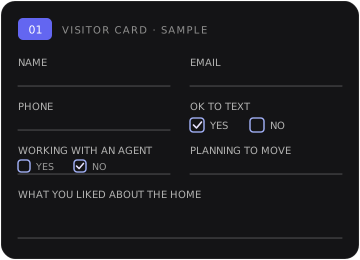
The sheet gives each visitor a numbered card that asks for a name, an email, a phone number and whether it is OK to text. It also asks whether they already work with an agent, when they plan to move and what they liked about the home. Those answers are what the prompt uses to shape each note.
Download the sign in sheet (PDF)
Tablet version: fillable PDF, 16 visitors
No email needed. Letter size, four visitors per page, with room to print clearly so the photo reads well. The fillable version is for typing on a tablet and has not been tested in every PDF app yet. Keep filled sheets in your own files.
Step 2
Turn one photo into every draft
- Reads the photo row by row and flags any field it cannot read instead of guessing.
- Asks you once for the property facts.
- Writes an email for each visitor, plus a short text only for visitors who ticked OK to text.
- Visitors who already have an agent get a brief, courteous note that points them back to their agent.
- Ends with a summary table and a list of things to check before you send.
Master prompt · open house follow up
You are helping me, a real estate agent, follow up with the people who signed in at my open house. I will give you a photo of the sign in sheet and the facts about the property.
What you get back
A summary table, then a draft for each visitor
| Visitor | Draft | Status |
|---|---|---|
| Visitor 1 | Email and short text | Ready |
| Visitor 2 | Email, has an agent | Ready |
| Visitor 3 | Email in Spanish, English for you | Ready |
| Visitor 4 | Email unreadable on the photo | Hold: check sheet |
Waiting for reviewSample. Example data only.
Each visitor gets the note that fits their answers
Hi [Name], it is [your name] from the open house at [listing address]. The details you asked about are in my email. Reply STOP to opt out.
Hola [Nombre], gracias por visitar [dirección] el [día]. Le envío los detalles de la casa por correo. ¿Le gustaría verla otra vez esta semana?
For you, not to send: Hi [Name], thanks for visiting [address] on [day]. I am emailing you the home details. Would you like to see it again this week?
Sample drafts with placeholders. Your drafts use your sheet and your listing facts.
Step 3
How to use the prompt
- Open ChatGPT, Claude or a similar assistant that accepts photos and paste the prompt.
- Attach a clear photo of the filled sheet and paste your listing facts, or answer when it asks.
- Read every draft, fix anything that is wrong, and send each one from your own email or phone.
If a visitor wrote in Spanish or another language, the prompt writes their note in that language, with a short English version underneath for you.
Before you upload a sheet, check your brokerage rules on putting client details into an AI tool. Texts need the visitor's consent. Email is the safer default when you are unsure. This guide is a writing aid and is not legal advice.
Suggested plan
A simple first week after the open house
Use the drafts for the first note, then keep each later touch short and about the home.
- Day 0
Same evening
A thank you note while the visit is fresh.
- Day 1
Answer what they asked
Reply from your listing facts.
- Day 3
Something useful
New facts about the home or similar homes. Property only.
- Day 7
One next step
Offer a second look or a question to answer.
Suggested plan, not a client result. Adjust it to your market and your brokerage rules.
Keep notes on the home
What the drafts leave out
- You send every draftNothing goes out on its own.
- The home and the next stepNo talk of who lives nearby.
- Texts need consentEmail is the safer default.
- Same options for everyoneYour brokerage rules apply.
The prompt tells the AI to keep each note on the property and the next step, and not to describe the neighborhood by who lives there or give opinions on schools or safety. For those questions it points to official sources. It also tells the AI to give the same options to everyone in the same situation. Read each draft before you send it. A draft is not a Fair Housing review, and LUR does not promise compliance. You and your brokerage decide what goes out.
Federal Fair Housing law protects race, color, religion, sex, disability, familial status, and national origin. State and local law can add more classes. Your brokerage rules still apply. This guide is a writing aid and is not legal advice.
Before a private showing, check your state and brokerage rules on a written buyer agreement. If a visitor has an agent, follow up through that agent or as your brokerage allows.
From prompt to setup
What LUR adds
The prompt handles a stack of follow ups in one go, after you take the photo. LUR can set it up around the way you already run open houses, so the drafts are waiting without the copy and paste.
- Sign inTablet at the door, or one photo of the paper sheet
- Your CRMVisitor answers land in your records
- Drafts waitingA draft for each visitor in your email
- You approveNothing goes out until you do
- With a tablet sign in at the door, visitor answers can go straight into your CRM, and a draft for each visitor can be waiting in your email, shaped by their answers on the sign in form.
- With a paper sheet, you send one photo and the drafts can be waiting in your email for your approval, with little copy and paste.
- Nothing goes out until you approve it.
Read more about LUR for real estate agents.
Your hours
Work out your own weekly hours
Type your own counts and minutes. Fields start empty and nothing is saved.
Fill in every box on a row to see your totals. Rows you leave blank are skipped.
Time on these tasks by hand: hours a weekIllustrative estimate from your inputs
Time checking ready drafts, using your guess: hours a weekIllustrative estimate from your inputs
Difference from your inputs: hours a weekIllustrative estimate from your inputs
Rows counted: Illustrative estimate from your inputs
These numbers come only from what you typed. LUR has not measured them. Nothing you type leaves this browser.
Talk it through
Want the drafts waiting for you after every open house?
Tell Carlos how your open houses run today, and he will say plainly whether a setup makes sense for you.
Get the master prompt
Carlos will follow up once to see if a short call makes sense. No newsletter blast. If the prompt helps and you want the drafts waiting for you after every open house, Carlos can show you how that works.
Your master prompt
- Paste it into ChatGPT, Claude or a similar assistant.
- Attach a photo of the filled sign in sheet and your listing facts.
- Read and edit every draft, then send each one yourself.